Quick tipGotchaMarketing Hub

Where did pop-up forms go? Pop-ups, slide-ins and banners are now CTAs

Look in the CTA tool, not Forms, for pop-ups.

Subscription
Check your Marketing Hub tier for CTA types
Permissions
Marketing access
Time
4 min · Beginner
Last verified

Short answer

Pop-ups now live in Marketing > CTAs. HubSpot's KB lists pop-up box, slide-in (a banner that slides in from a corner) and sticky banner types, which you can also trigger when a visitor clicks a button. You can hide them on small screens. If one does not appear, check the targeting, the trigger and whether it was hidden for that screen size.

1. The CTA tool

My demo portal has one draft pop-up in the CTA list.
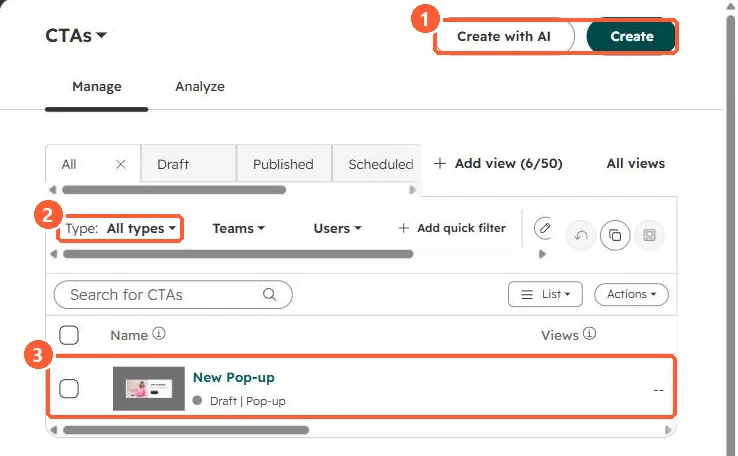
CTAs list with Create and Create with AI buttons, a Type filter and a draft pop-up
Create (1), the Type filter (2), and a draft pop-up (3).

2. Old CTAs

Legacy CTAs are a separate tool. See legacy vs new CTAs.

3. Forms inside pop-ups

A pop-up can include a form. Spam controls still apply. See form spam settings.

Sources

New field notes by email

One email when a new article publishes.

Still stuck?

If this did not fix it, the problem is probably specific to your setup. Book a call and we will look at it together.

Book a call with Sam